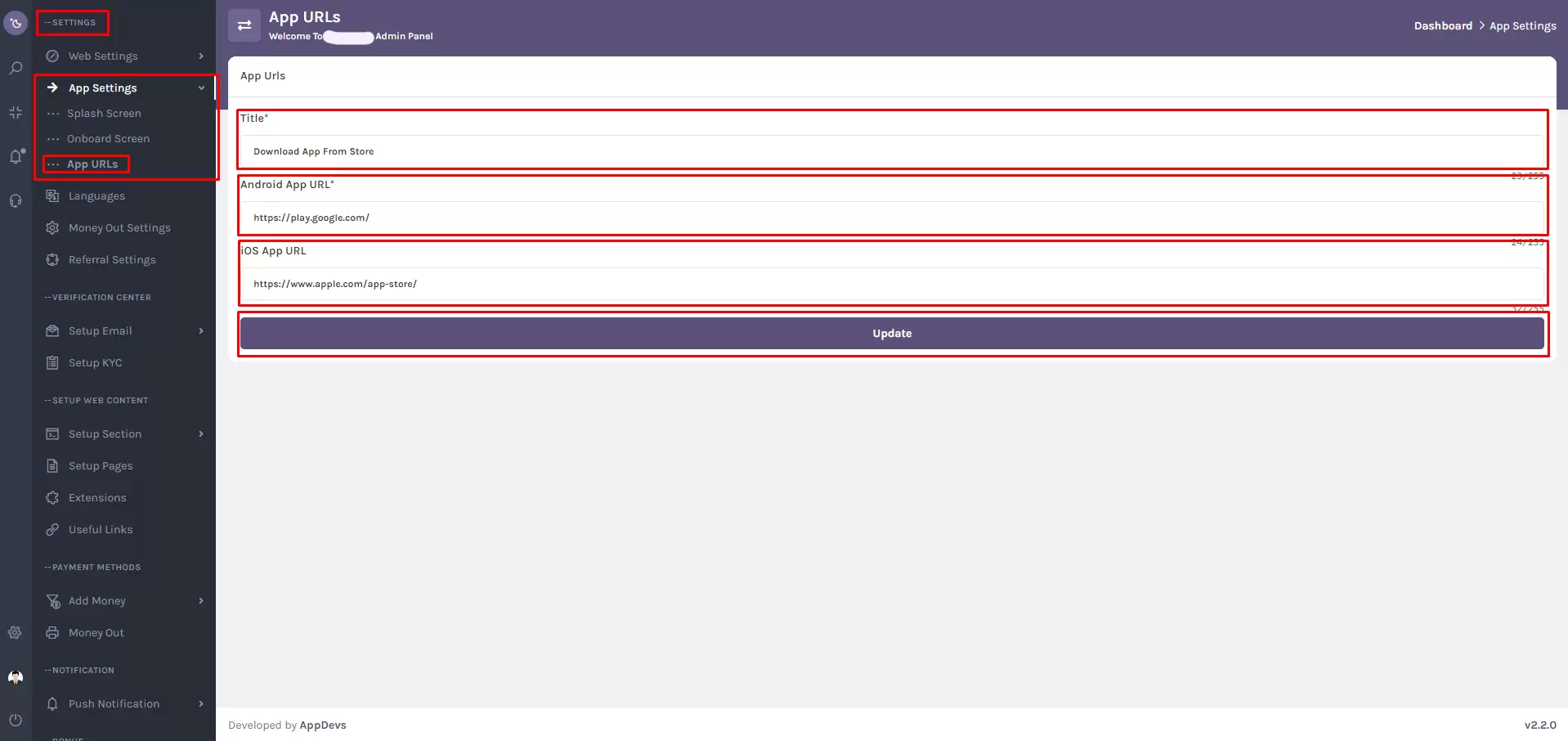









The App URLs feature in the super-admin panel enables website administrators to seamlessly integrate Android and iOS app links, making it easier for users to access mobile applications directly from the website.
Navigation Path
Go to: Settings > App Settings > App URLs
Alternatively, use the sidebar search to find "App URLs" in the super-admin panel.
How to Configure App URLs
1. Title
In the Title field, input the label that will be displayed on your website. This title should clearly indicate the availability of your mobile apps to users.
2. Android App URL
Provide the direct Google Play Store URL for your Android app in the Android App URL input field.
This allows Android users to quickly access and install your application.
3. iOS App URL
Enter the Apple App Store URL for your iOS app in the iOS App URL input field.
iOS users will be able to download the app through this link.
4. Update
Click the "Update" button to save all entries and reflect changes on your website instantly.
📝 Best Practices
- Ensure both app URLs are accurate, functional, and up to date.
- Use clear and concise titles that encourage users to download your mobile app.
- Test the links after saving to confirm proper redirection to app stores.
Note:
This feature simplifies mobile app promotion by providing a dedicated, centralized location for app links, enhancing user experience for both Android and iOS audiences.