







Configuring SMTP mail in the super-admin panel ensures seamless email communication. Follow these step-by-step instructions to set up your SMTP settings correctly.
Step 1: Navigate to the Email Method Settings
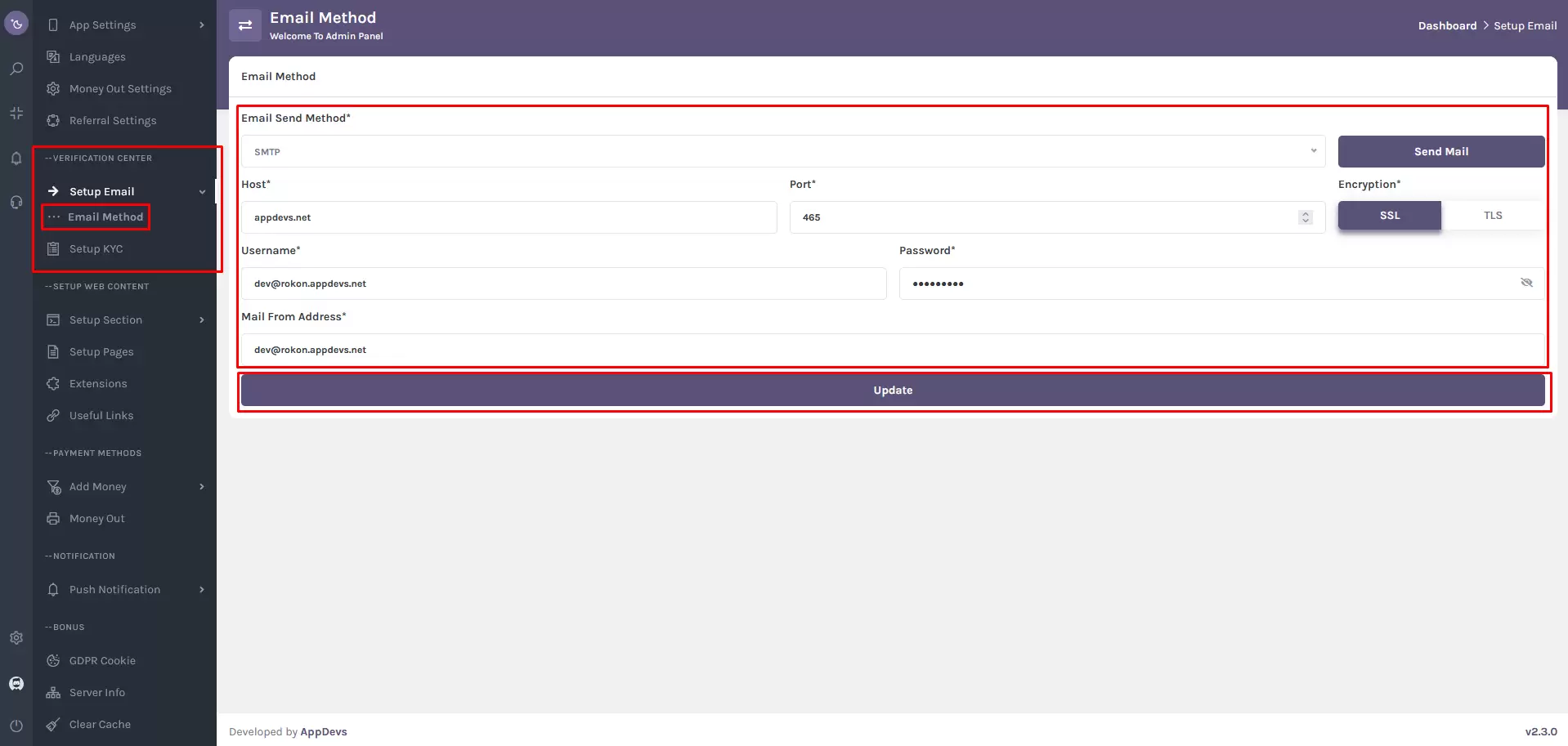
Verification Center > Setup Email > Email Method
Alternatively, you can search for "Email Method" using the super-admin sidebar search.
Step 2: Configure SMTP Settings
1. Select Email Send Method
- Open the Email Method form in the Verification Center.
- Choose SMTP as the Email Send Method (Only SMTP is available).
2. Configure SMTP Settings
- Host: Enter your domain name (e.g.,
example.com). This should match your SMTP server's domain. - Encryption: Toggle between SSL and TLS based on your SMTP server’s requirements for secure communication.
- Username: Input your webmail username (e.g.,
example@example.com). - Password: Enter your webmail password (ensure accuracy for authentication).
- Mail From Address: Specify the sender's email (must match your webmail username).
Step 3: Save and Verify Settings
Once all fields are completed, click “Update” to save the SMTP configuration.
Important Notes
🔹 If the admin panel fails to send emails, a notification will appear on the Email Method page.
🔹 Double-check all entered details to match your email service provider's settings.
🔹 If issues persist, consult your email provider’s support team for troubleshooting assistance.
Following these steps will enable the super-admin panel to send emails via SMTP securely and efficiently.